

Working with complex data models requires quite a bit of focus – there is a lot going on. Rather than the references you need to establish and maintain adding to that cognitive load, I have found that using a convention for naming data ranges allows me to give more attention to developing the model itself. Let me explain a bit, and hopefully push the envelope a bit for you.
A key secret to reducing the complexity is abstracting, and one of the ways this can be done is by using a hierarchical naming convention. If this is getting too detailed, feel free to bail and leave the detailed modelling to the experts – 95% of Excel users use 5% of Excel’s functions. For those open to alternative ways of storing and addressing your data sets read on.
For me, this started when I first began building more complicated models. Before long, you start to put all your assumptions in one place and it was a way of grouping the information within the worksheet. So, I would have all the financial driver assumptions grouped together, the operational assumptions grouped together. I mentioned naming data ranges in the first paragraph, if you’re not already familiar with that, it’s a way of assigning a name to a range of data so it can be referenced in a formula or in code. It makes your formulae far easier to read which is where the naming hierarchy starts to come into use. You can also use the Go To function (also accessible by pressing F5) to jump to the named range from wherever you are in the workbook.
For example, in Figure 1, all of the financial parameters are prefixed with “param_fin_”, so when they need to be referenced in a formula, I use the named range rather than the actual cell reference. So if wanted to calculate the Net Present Value (NPV) of a cashflow I would type in =NPV(param_fin_wacc,$C12:$N12), although most likely $C12:$N12 would also be a named range.
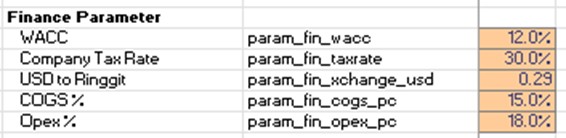
Figure 1: Related Financial Parameters have the Same Prefix
Once grouped it’s worth considering if there are any further sub-groupings that may be appropriate, as for at least a few categories this will most likely be the case. As models become more complex there can be levels of several levels of sub-grouping.
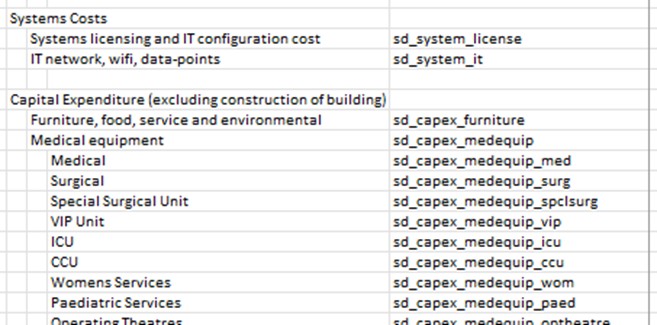
Figure 2: Categories can be Sub-categorised
As a very simple next step, in the screenshot above, I have categorised each of these variables as to whether it is a system cost or a capital expenditure cost and then having further items within each category.
Initially, I only applied the naming approach to the Assumptions or Parameters worksheet, but my approach these days, is to extend the hierarchical naming approach to all worksheets within the workbook. I also follow the convention of starting each named range with a reference to the worksheet where that name is defined.

Figure 3: Naming Extended to Cover Source Worksheet
All these figures are on the KPIs worksheet, so they are -prefixed by “kpi_”. The data is categorised as to whether they are operational statistics or the number and type of surgery using the “stats_” and “surg_” names in the naming hierarchy.
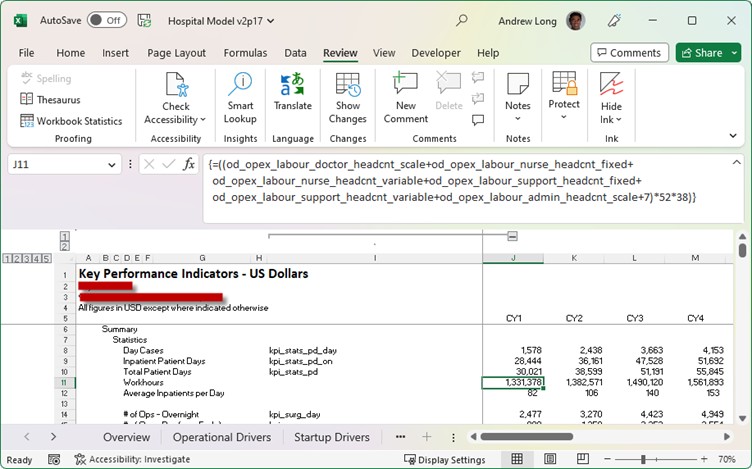
Figure 4: Eminently More Readable and Understandable Formulae
If using named ranges well, formulae becoming far more readable. For example, looking at the formulae in Figure 4 for cell J11, we can see that there are a number of ranges coming from a worksheet “od”, looking at the worksheet names we realise “od” is “Operational Drivers” and that all the fixed and variable labour resource required for a year are being calculated.
Whilst using named hierarchical ranges is a simple technique, it is one that I have found useful for modelling and gives you a lot of leverage for the time spent setting it up, especially for a complex model. It is important that you plan and group all your inputs before you start naming your data ranges if you want to get the most out of this technique.
I hope that gives you a few ideas about how you might extend the use of named ranges into your spreadsheet modelling toolkit.
I am sure that other people must be using other techniques to improve the way they do modelling. If you do have one or more it would be great if you were open to sharing some of them.